MORE NOISE. LESS BULLSHIT.

band practice. on your terms.

open bandprac


free forever. no account. no subscription. no cap.

Good tools shouldn’t come with strings.

Practice should be about the song, not an account, a subscription or a counter telling you to stop. bandprac is a free app for your computer: bring the music you already have, and learn your part in the band’s version of the song.

how it works

THREE STEPS. THEN PLAY.

  1. Add your songs

    Drop in audio files or a whole folder: MP3, WAV, FLAC and more, even a gig filmed on your phone. Your originals aren’t changed.

  2. Say what you play

    Bass, drums, vocals, guitar or keys. bandprac splits each song into parts on your computer. It takes a few minutes a song, so set it going and come back.

  3. Practise

    Play along with the band and your part muted, or hear just your part. Slow it down, change the key, loop the hard bit.
what’s in it

EVERYTHING FOR PRACTICE. NOTHING ELSE.

HEAR YOUR PART

  • Split any song into parts.Bass, drums, vocals and the rest, plus guitar and keys.
  • Mute me, or just me.Play along with the band and your part taken out, or hear only your part.
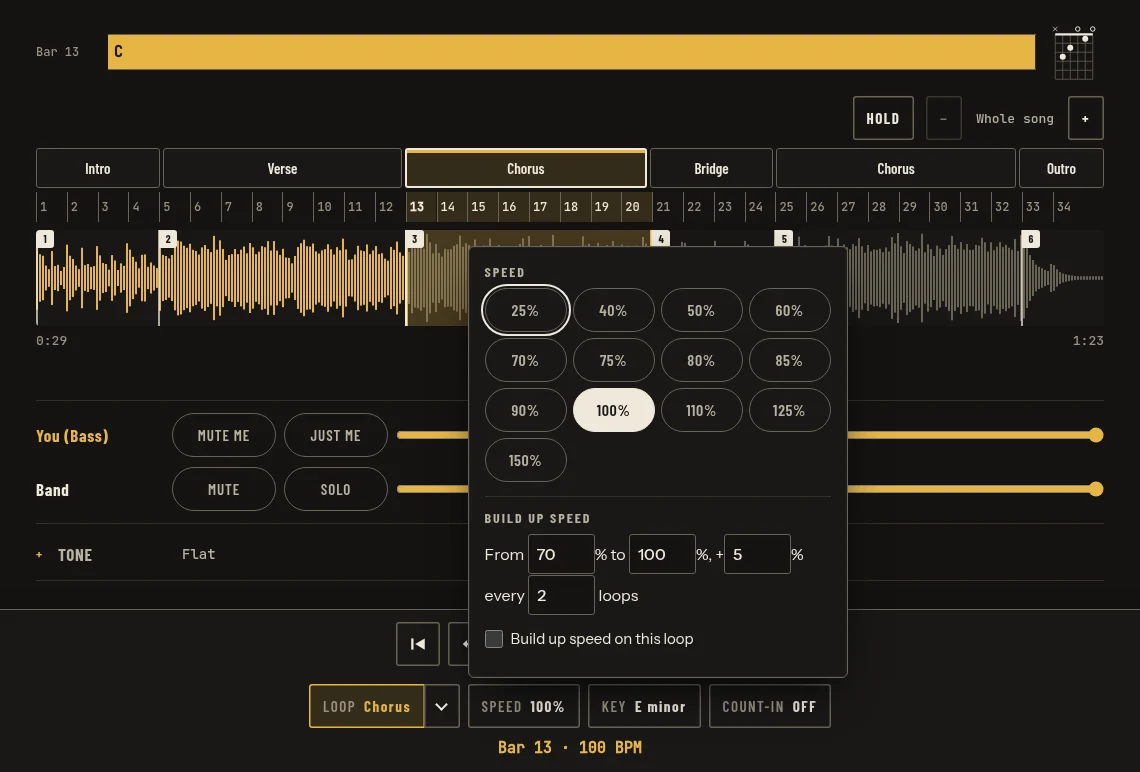
  • Slow it down.Down to 25% without changing the pitch, or speed it up to 150%.
  • Change the key.Up to six semitones up or down, with fine tuning for old records that aren’t at A = 440.
  • Loop the hard bit.Tap a section or a bar, or drag across the waveform, and save the loops you want to keep.
  • Build up speed.Start a loop slow and it gets a little faster every few times round.
  • Count-in and click.One or two bars before you start, and the click can keep going.
  • Call and response.It plays the phrase, then leaves you a turn to play it back.
The bandprac practice player: the song's sections and bars over the waveform, the chorus looped, the bass part with Mute me and Just me, and the speed menu from 25% to 150% with Build up speed
The practice player: the chorus looped, the speed menu open.

READ IT

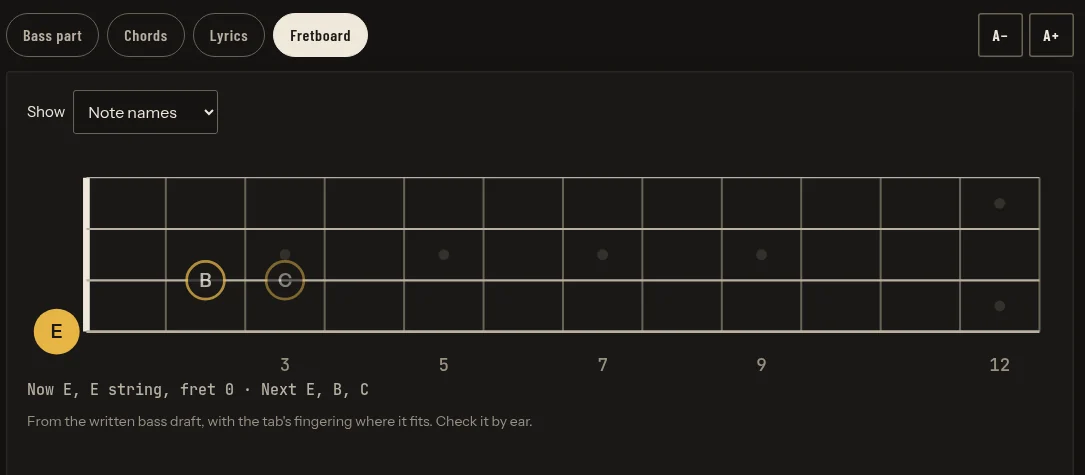
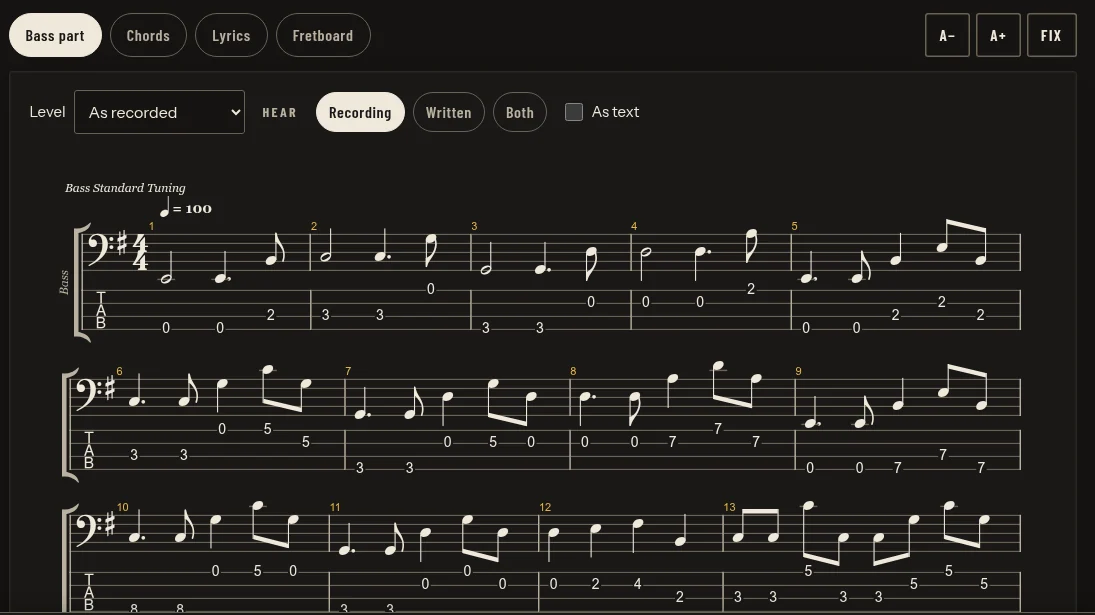
  • The bass part, written out.Notation and tab, with simpler levels while you learn, and a fretboard that shows the next notes.Bass only for now. It’s worked out from the recording, so check it by ear.
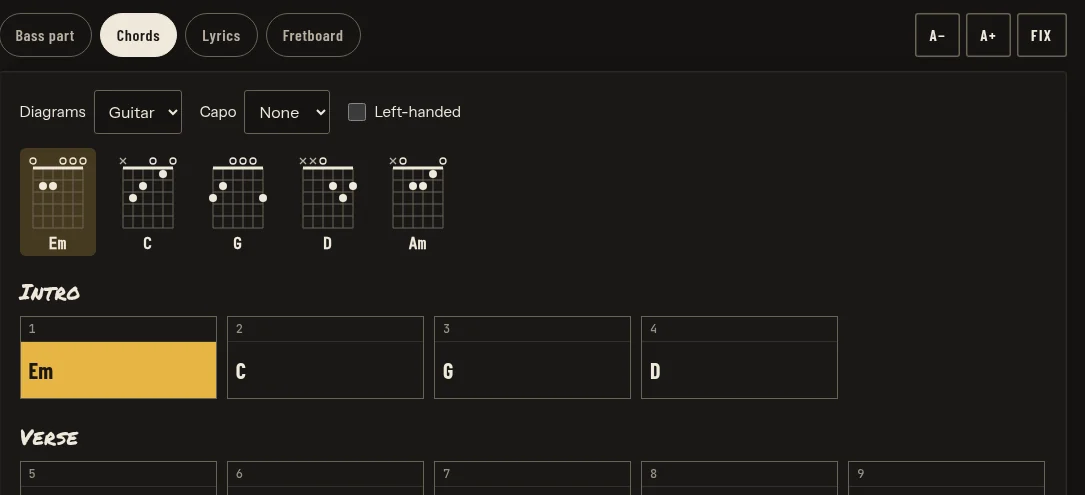
  • Chord charts.Tap a beat to write a chord or fix one, then see guitar or keys shapes, with a capo if you use one.
  • Lyrics.Paste the words in; an optional download makes English lyrics follow the song.
The Read tab: the bass part in notation and tab, bars numbered, with Recording, Written and Both to choose what you hear
The bass part. The sample song brings its own; for your songs it’s worked out from the recording.
The fretboard view: a bass neck showing the note now, E on the open E string, and the next notes B and C
The fretboard: the note now and the ones coming up.
The chord chart: guitar shapes for Em, C, G, D and Am above the song's bars, grouped into Intro and Verse
The chord chart, with guitar shapes.

PLAY IT WITH THE BAND

  • Setlists in the band’s order.Drag the songs into order, then Rehearse plays the set straight through.
  • The band’s version.Save the key and tempo the band plays it in, and a note, so it opens that way every time.
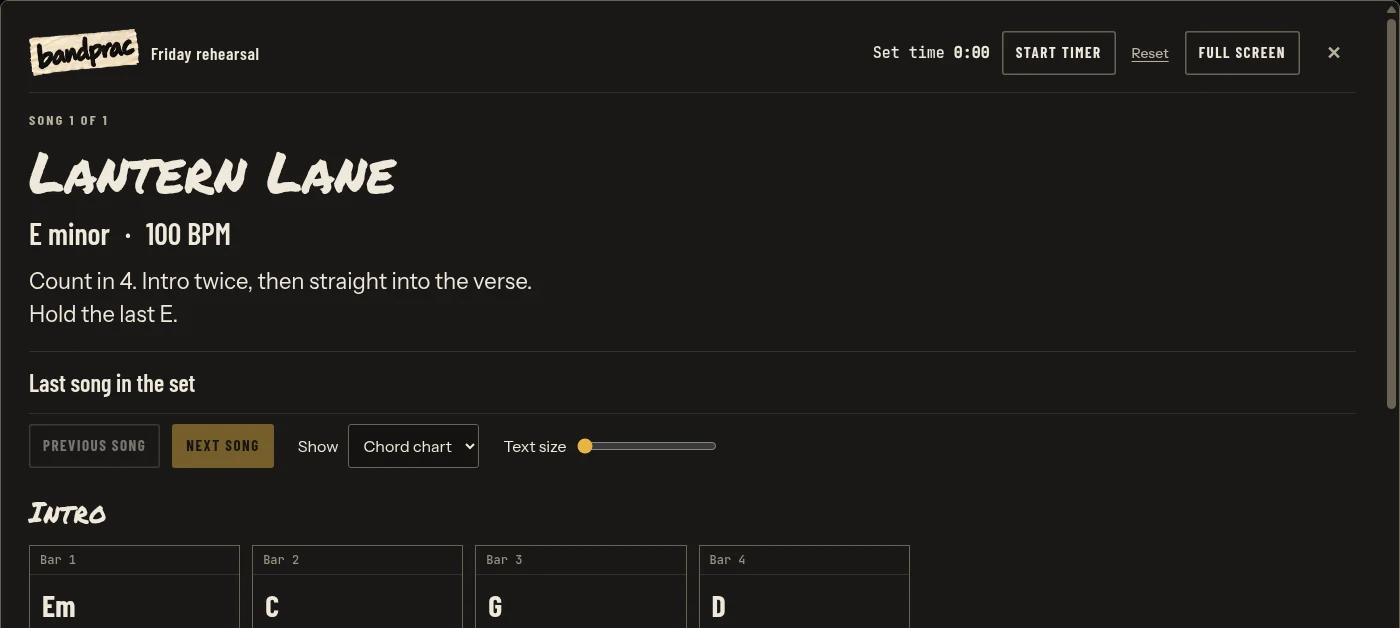
  • Gig view.Big, simple song sheets for a music stand, a second screen or a TV: key, tempo, notes, and the chords or the bass part.
  • Foot pedal.A two-button page-turner pedal steps through sections and songs.
  • Band packs.Send the plan to your bandmates. It carries settings and corrections, not audio; everyone brings their own recording.
Gig view: Lantern Lane in large type, E minor at 100 BPM, the band's note, Previous and Next song, and the chord chart by section
Gig view, with the band’s note for the song.

AND THE REST

  • Record yourself.Record a take of your part over the band, at the speed and key you’re practising.
  • Tuner.A chromatic tuner on your microphone. Nothing is recorded.
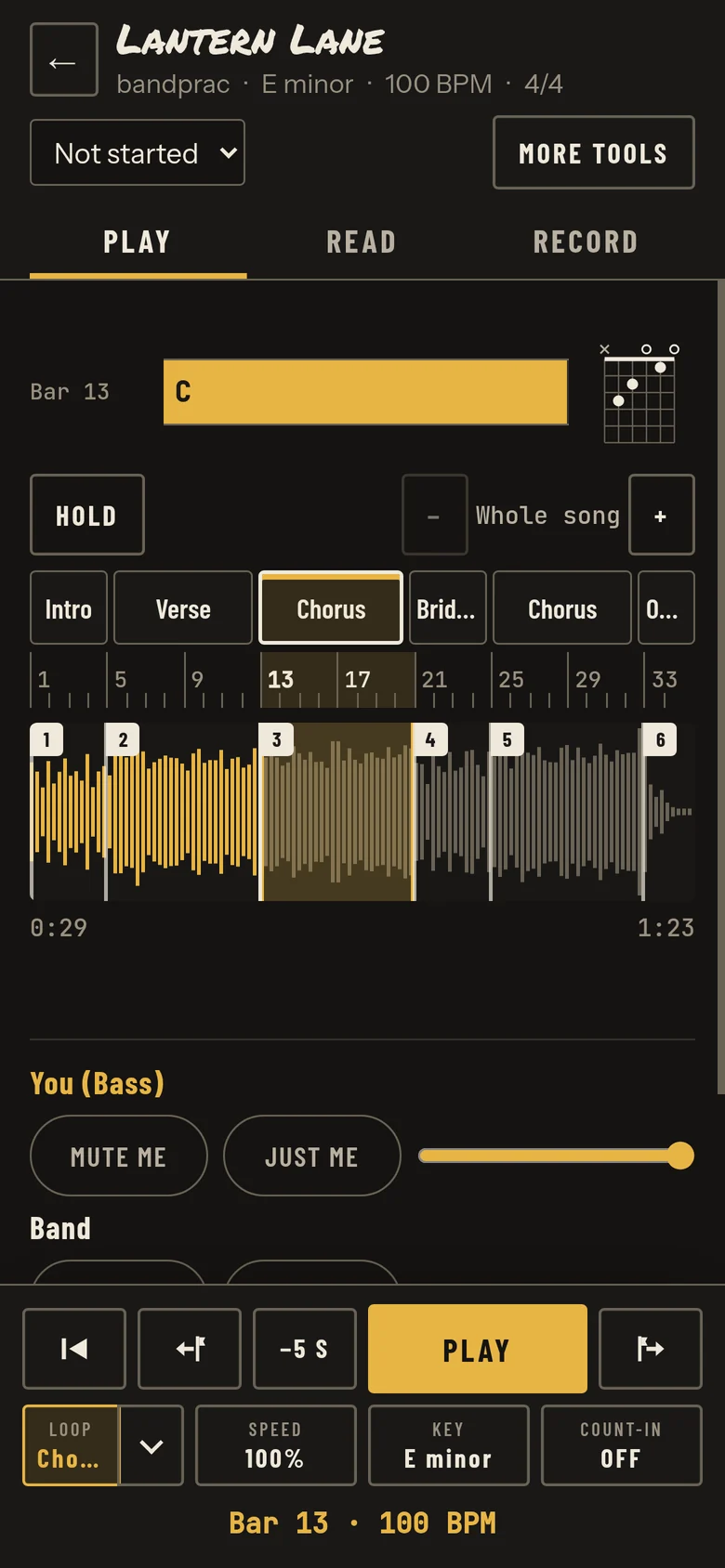
  • Use it from your phone.Scan a code on the same Wi-Fi. The computer does the work, so leave it awake.
  • Stays on your computer.Splitting, playback and everything you write happen on your computer. Your audio is never uploaded.
The practice player on a phone-sized screen, with the same sections, loop, Mute me and Just me, and the transport
The same player, phone-sized.

Screenshots of bandprac 0.4.1 with its built-in sample song, Lantern Lane, taken from the app itself.

NO PASS AT THE DOOR.

Free forever. Bring your music. Get on with playing.

  • WINDOWS

    Windows 10 / 11 • x64

    get bandprac for Windows (zip, 72 MB)

    Extract all the files, then open bandprac.exe. It isn’t signed yet: choose More info, then Run anyway.

  • MAC

    Apple silicon

    get bandprac for Mac (zip, 7.6 MB)

    Unzip it, then open bandprac. It isn’t signed yet: choose Done, then Open Anyway in System Settings > Privacy & Security (once).

Needs Windows 10 or 11 (64-bit) or a Mac with Apple silicon, and the internet once, for setup.

Use recordings you have the right to use.

tip jar

SHOUT ME A BEER.

bandprac is free and it’s staying free. No catch, no upsell. If it’s earned a spot in your practice, shout me a beer. It goes toward building more free tools like this one, made in Perth.

buy me a beer (Ko-fi, opens in a new tab) monthly round (Ko-fi, opens in a new tab)

Totally optional. bandprac works exactly the same either way.

questions

THE SHORT VERSION.

Is it really free?
Yes. Free forever: no account, no subscription and no limit on songs.
What do I need?
A Windows 10 or 11 PC (64-bit) or a Mac with Apple silicon, and your own music. Setup downloads the audio engine and the models once, so you need the internet for that. On Windows an NVIDIA graphics card makes it faster, but any PC works.
Does my music leave my computer?
No. Splitting songs, playback, the written parts and your corrections all happen on your computer, and your audio is never uploaded. bandprac goes online to set itself up and to check for updates, and for the optional Spotify source, which is off unless you turn it on.
My computer warns me when I open it. Is that OK?
Yes, for now: bandprac isn’t signed with a paid Apple developer account or a Windows code-signing certificate yet. On a Mac, choose Done, then Open Anyway in System Settings > Privacy & Security (once). On Windows, choose More info, then Run anyway.